SSHole (CVE-2026-123158): How a Long Password Opened Locked Accounts on Alpine Linux
SSHole (CVE-2026-123158) let oversized passwords open locked accounts on Alpine and musl OpenSSH servers. How it works, who is exposed and how to detect it.
On Alpine Linux and other musl-based systems, an OpenSSH server could be talked into accepting any password of roughly 257 to 1,024 bytes for accounts that are supposed to have no password at all. A fix shipped on 5 November 2026. Exploit code followed within about four hours, attack attempts began the same day, and the first confirmed successful compromise was recorded about 40 hours later. CISA added it to the Known Exploited Vulnerabilities catalog on 9 November, four days after the fix. The bug is narrow, but it shows that “locked” accounts, container images and in-band error values are weaker than they look, and that is why it deserves more attention than a routine patch notice.
Executive summary
CVE-2026-123158, nicknamed “SSHole,” is an authentication bypass in the OpenSSH server (sshd) on Linux systems that use the musl C library and do not use PAM (Pluggable Authentication Modules), the usual Linux login framework. Alpine Linux, the small distribution behind many container images and cloud appliances, ships exactly that build by default. An attacker who can reach such a server over SSH can log in as an account whose password field is *, the long-standing convention for “this account has no password,” by sending an oversized password. OpenSSH 10.6p2 and patched Alpine packages close the hole, and setting PasswordAuthentication no blocks it entirely [1][3][7].
Most enterprise Linux servers run glibc with PAM and are not affected. The exposure sits in less visible places: Alpine-based images that someone added an SSH server to, cloud images, build agents, appliances and embedded devices. Those are the places where asset inventories are weakest and where patching means rebuilding an image, not running an update.
Why this matters now
The timeline left defenders very little time:
- 5 November: OpenSSH released 10.6p2, crediting researcher Özgün Kültekin of Wakefield, and the advisory was relayed to the oss-security mailing list the same day [1][3]. Kültekin published a detailed write-up [5], and exploit code was public about four hours later [10].
- 5 to 7 November: SANS Internet Storm Center honeypots recorded a sharp rise in unusually long SSH passwords: 232 on 5 November, 713 on 6 November and 246 on 7 November. The first real exploit attempts used passwords made entirely of the letter “A” [11].
- 6 November: watchTowr reported exploitation linked to botnets and cryptocurrency mining [10].
- 7 November, 00:46 UTC: GreyNoise recorded its first successful exploitation chain [10].
- 9 November: CISA added the flaw to the KEV catalog [8], with a federal remediation deadline of 12 November reported by The Hacker News [12].
The attacks seen so far are opportunistic, and Defused described the activity as limited [10]. The speed is still the lesson: a reliable, one-request authentication bypass needs no exploit engineering, so the gap between patch and attack shrinks to hours.
Understanding the threat: four reasonable decisions that combined badly
No single component is obviously broken. The bypass appears only when four separately reasonable design decisions meet.
1. * means “no password.” In /etc/shadow, a password field that cannot be a valid hash, conventionally * or !, means password login is impossible for that account. Service accounts, key-only users and directory-backed users often carry it. According to the researcher, Alpine has used * for root since about 2022 [5].
2. sshd hashes passwords even for locked accounts. In 2016, CVE-2016-6210 showed that sshd answered faster for accounts without a real hash, so attackers could enumerate valid usernames by timing. The fix made sshd hash every candidate password anyway, borrowing a salt from another account on the system when the target account has none [9][5].
3. musl reports errors in-band. The POSIX crypt() interface hashes a password with a salt. When it fails, some implementations return a null pointer and others return a “failure token,” a string that should never match a real hash. musl’s SHA-512 implementation refuses keys longer than 256 bytes and returns the token * [4][5].
4. The comparison is a plain string match. sshd compares the computed hash with the stored field. If both are *, they match.
The flow below shows how those decisions chain together. Follow the red path: every step is behaving as designed.
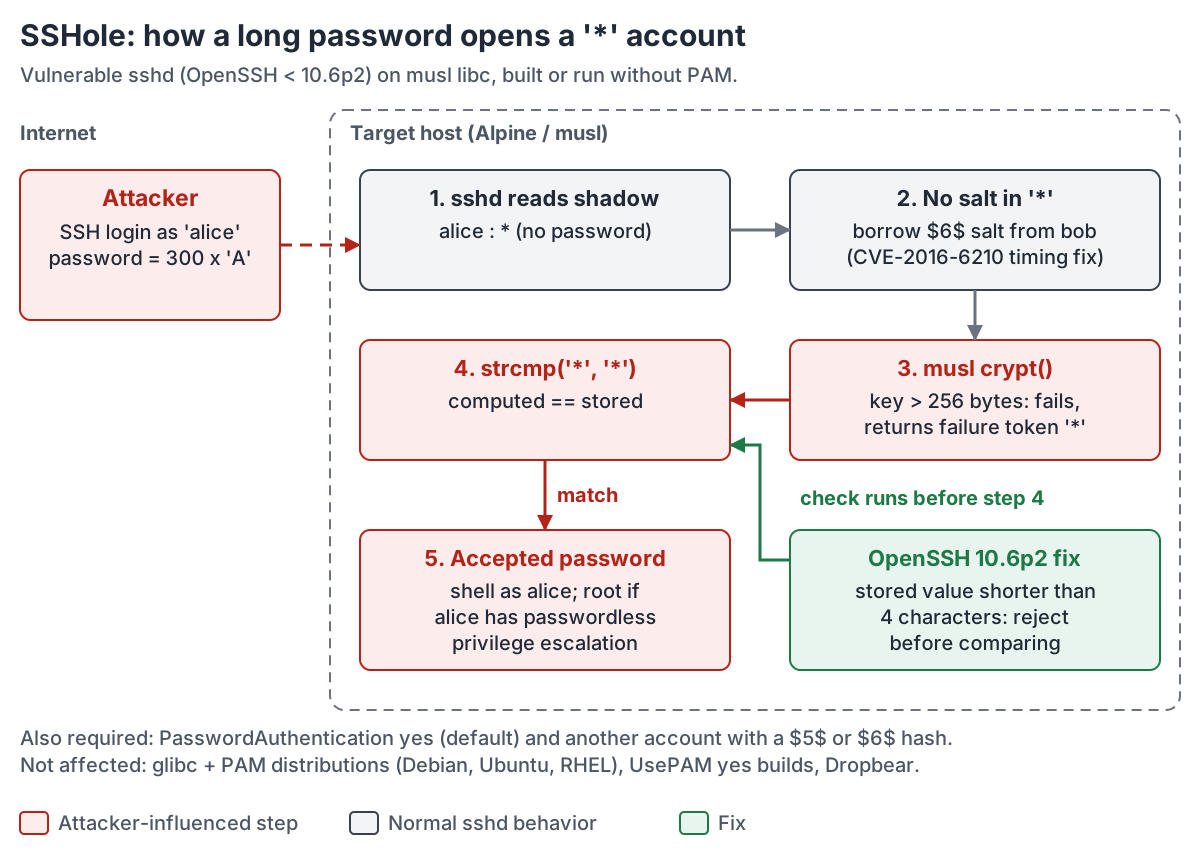 Figure 1. How an oversized password turns a “locked” account into an open one on a vulnerable musl, non-PAM sshd, and where OpenSSH 10.6p2 stops it.
How the attack works
Preconditions
The researcher’s checker and the oss-security advisory list five conditions, and all of them must hold [3][6]:
- sshd is linked against musl (Alpine, and musl builds of Buildroot, Yocto, OpenWrt, postmarketOS, Void and others).
- No PAM in the password path: sshd is built without PAM, or
UsePAM no. Alpine’s standardopenssh-serverpackage is built without PAM;openssh-server-pamwithUsePAM yesis not affected. PasswordAuthentication yes, which is the upstream default.- The target account’s shadow field is exactly
*. - At least one other account has a real SHA-256 (
$5$) or SHA-512 ($6$) hash, which supplies the salt.
glibc distributions such as Debian, Ubuntu, Fedora and RHEL, PAM-based builds, Dropbear, OpenBSD, FreeBSD and macOS are outside the affected configuration [5][6]. OpenWrt uses Dropbear by default, so it is exposed only where the OpenSSH server has been installed in its place.
The code path
The sketch below is a simplified illustration based on the published fix and the maintainers’ descriptions. It is not verbatim OpenSSH source [2][3][4].
/* Illustrative sketch of sshd password checking on a non-PAM build */
stored = shadow_pw(pw);              /* "*" for a locked account          */
salt   = usable_salt(stored);        /* "*" carries no salt, so NULL      */
if (salt == NULL)
    salt = pick_salt();              /* borrow "$6$..." from another user */
                                     /* (the CVE-2016-6210 timing fix)    */
computed = crypt(password, salt);    /* musl: key > 256 bytes, so "*"     */
return strcmp(computed, stored) == 0;/* "*" == "*", so access granted     */

/* OpenSSH 10.6p2 instead requires a plausible stored hash:             */
/* return strlen(stored) >= 4 && strcmp(computed, stored) == 0;         */
The attacker’s request is one ordinary SSH password attempt. There is no memory corruption, no race and no special tooling, which explains why honeypots saw working attempts within hours [11].
What attackers did next
GreyNoise, as reported by BleepingComputer, recorded more than a dozen successful chains from six source addresses (16 per BleepingComputer, 18 per The Hacker News) [10][12]. Its sensors saw the following:
- Reconnaissance of the host and its container environment.
- Queries to cloud instance metadata services.
- Attempts to read password hashes and root SSH keys.
- Changes to
authorized_keysfor persistence.
In one case an actor reached root and installed TAC Agent, a Python command-and-control implant that supports shell execution, file transfer and self-update. It was persisted with a startup service; its server was unreachable and it never received a task. GreyNoise noted that the implant’s comments and errors were in Chinese, which by itself is not attribution [10]. No victim organizations have been named.
In MITRE ATT&CK terms, the chain is Valid Accounts (T1078) over Remote Services: SSH (T1021.004), followed by SSH Authorized Keys persistence (T1098.004) and Cloud Instance Metadata API credential access (T1552.005) [14].
Technical findings and analysis
The following points are this publication’s own analysis, built on the evidence above.
“Locked” is a convention, not a control
Security teams usually treat a * in the shadow file as a guarantee: the account cannot log in with a password. SSHole shows that the guarantee rests on every consumer of that field interpreting it the same way. Nothing in the operating system enforces it. The account was never locked in a cryptographic sense; it was locked because no computed hash was expected to equal *. When one library emitted * as an error string, the convention collapsed. The durable control sits one layer up: if sshd does not offer password authentication at all, the meaning of the shadow field stops mattering.
Sentinel values are a security boundary
The musl maintainer’s analysis is candid. OpenBSD, FreeBSD and recent Fedora return a null pointer when crypt() fails. musl, NetBSD and libxcrypt return failure tokens. musl chose *, the one string most likely to appear in a shadow file [4]. A participant in the oss-security thread summed up the portability picture: no one knows what crypt() returns on error, so authenticating by comparing its output is “optimistic” [13]. OpenSSH’s response was to stop trusting the comparison for any stored value too short to be a hash. The maintainers fixed it in sshd while stating that the root cause lies outside it [1][2]. musl’s maintainer, for his part, regards it as a misuse of crypt() by the caller rather than a musl bug [4]. musl still plans to move to the more common *0/*1 tokens and to reconsider returning errors properly [4].
The general engineering lesson goes well beyond SSH. Whenever an error is reported as a value from the same domain as valid results, an attacker who can force the error may be able to forge a result. Code reviews of authentication paths should ask what every dependency returns on failure.
A security fix created the precondition
The salt borrowing that makes SSHole work was itself a security fix. It closed a username-enumeration timing leak in 2016 [9]. That is not an argument against the fix. Defensive code paths still run on attacker input, and they deserve the same adversarial testing as the features they protect. The researcher found the flaw with an automated sweep of roughly 17,600 logins across glibc, musl, PAM and shadow combinations, in which only one build diverged [5][9]. Differential testing of that kind is cheap, and it is precisely how latent interactions like this one are found.
Patching happens in images, not on hosts
On a traditional server, apk upgrade openssh and a restart are the fix [7]. Many Alpine systems are not traditional servers, though. In those environments:
- A container running sshd keeps the vulnerable binary until its image is rebuilt and redeployed, so a running container is never really patched.
- Embedded and appliance firmware built with Buildroot or Yocto waits for a vendor release.
- Vulnerability scanners that read package databases will flag Alpine packages but can miss sshd compiled into a vendor image.
The exposed population is therefore hard to measure. Internet scans can find SSH banners, but they cannot tell a musl, non-PAM build from a safe one without attempting authentication.
The best detection is an impossible event
Exploit traffic is hard to see in logs, because sshd does not record password contents. The successful exploit, however, produces an entry that cannot occur on a healthy system: Accepted password for <user> where that user’s shadow field is *. The detection does not depend on payload shape, and it carries over to any future bypass of the same kind.
Controls that break the chain
Prevention and detection here are mostly a matter of configuration and telemetry, not of a specific product.
Configuration and hardening. PasswordAuthentication no (and KbdInteractiveAuthentication no) removes the attack surface regardless of libc or patch level. The researcher recommends placing it in a drop-in file under /etc/ssh/sshd_config.d/ [5]. Keep PermitRootLogin prohibit-password or no. The public proof of concept had to set PermitRootLogin yes to reach root directly [6]. Where passwords are genuinely needed, the PAM build (openssh-server-pam, UsePAM yes) is outside the affected configuration [6].
Exposure and vulnerability management. Container and software composition scanners can match Alpine openssh package versions against the fixed releases listed by Alpine [7]. Their limits:
- They report the package, not whether password authentication is enabled or whether a
*account exists. - They are blind to sshd binaries outside package databases.
Cloud security posture tools (CSPM, CNAPP) add the network view: which workloads expose TCP 22 to the internet. Combining both answers the question that matters, which is which internet-reachable workloads run a vulnerable configuration.
Endpoint and workload telemetry. Linux EDR sensors, auditd or eBPF-based tools can watch for the post-exploitation behavior GreyNoise saw:
- Writes to
authorized_keys. - Reads of
/etc/shadow. - New startup services.
- Processes under sshd sessions contacting
169.254.169.254.
Their main limitation is coverage. Minimal Alpine containers rarely carry an agent, so host-level or node-level sensors and cloud audit logs must fill the gap.
Cloud metadata hardening. Requiring session-token metadata access (for example AWS IMDSv2) and limiting the hop count reduces what a compromised container can take from the host’s instance role. It does not protect the compromised instance itself.
SIEM correlation. Joining sshd authentication logs to an inventory of locked accounts implements the impossible-event detection. Many containers write sshd logs to stderr or not at all, so confirming that those logs reach the SIEM is part of the fix.
Recommended security architecture
The second figure maps the five preconditions to the controls that remove, expose or neutralize them. A single broken link is enough to prevent exploitation; layering them limits damage from the next flaw of this kind.
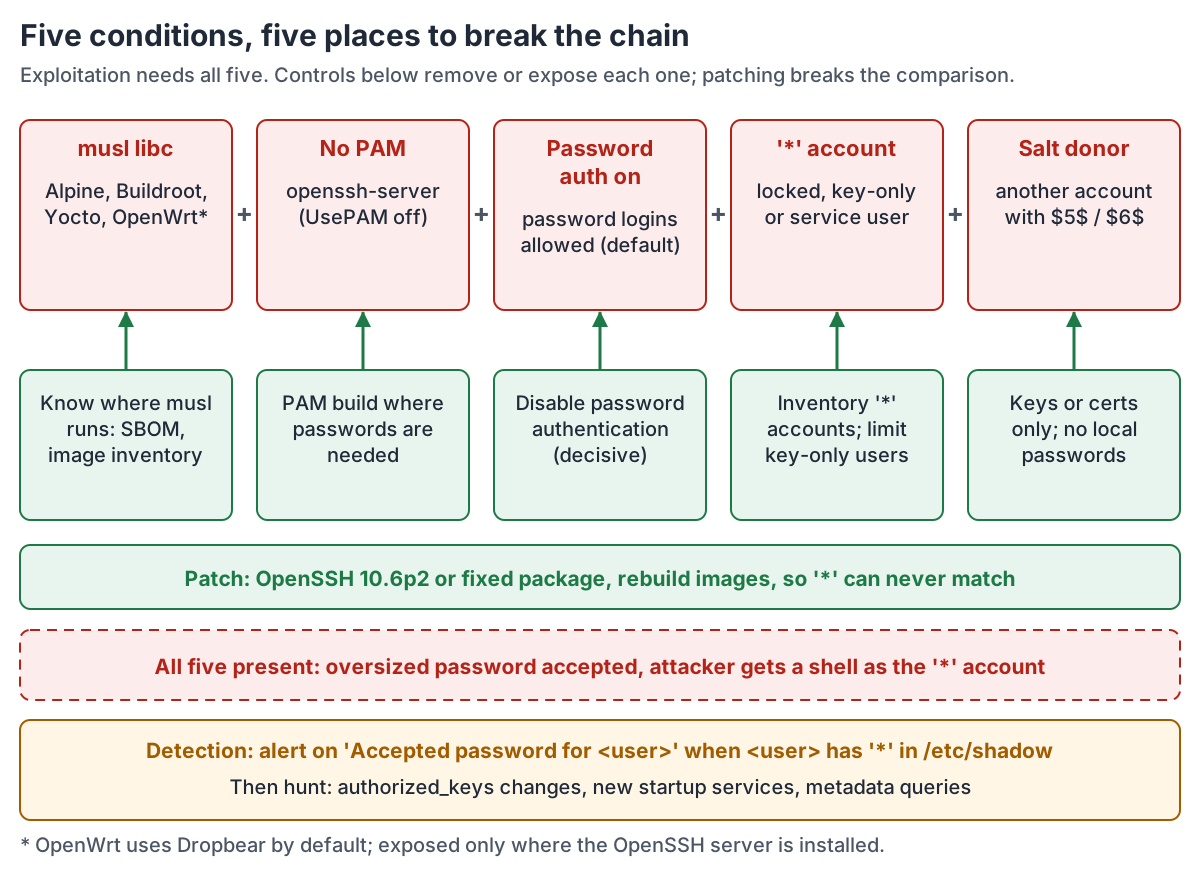 Figure 2. Every precondition is a place to break the chain. Disabling password authentication and patching sshd are the decisive controls; detection covers the window before both are complete.
In a mature architecture, interactive SSH should not depend on passwords anywhere:
- Administrators authenticate to a bastion or session broker with their identity provider and MFA, then reach workloads with short-lived SSH certificates or keys issued per session.
- Workloads accept only keys signed by the organization’s SSH certificate authority, and do not listen on 22 from the internet.
- Container images used in production do not run sshd at all; debugging goes through the orchestrator’s exec channel, which is itself governed by role-based access control and audit logging.
The residual risks remain:
- Embedded devices and vendor appliances that the organization cannot reconfigure.
- Forgotten images.
- Break-glass paths that teams leave on password authentication “just in case.”
Practical implementation guide
Immediate actions (24 to 72 hours)
- Find affected configurations. Run a check like the one below on Alpine and other musl hosts and in images that include sshd. It is illustrative and has not been production-validated.
#!/bin/sh
# Illustrative exposure check for CVE-2026-123158. Run as root.
ls /lib/ld-musl-* >/dev/null 2>&1 && echo "libc: musl" || echo "libc: not musl (outside affected configuration)"
apk info -v openssh-server 2>/dev/null | grep . || sshd -V 2>&1  # Alpine backports fixes: compare the package release
sshd -T 2>/dev/null | grep -Ei '^(passwordauthentication|usepam|permitrootlogin) '
echo "Accounts whose password field is exactly '*':"
awk -F: '$2=="*" {print "  " $1}' /etc/shadow
echo "Accounts with SHA-256/SHA-512 hashes (salt donors):"
awk -F: '$2 ~ /^\$[56]\$/ {print "  " $1}' /etc/shadow
On Alpine, compare the package release (for example 10.3_p1-r2 on 3.24) with the tracker rather than the upstream version string, because fixes are backported [7]. sshd -T does not evaluate Match blocks, so also check them for per-user or per-address PasswordAuthentication yes.
- Patch or disable.
- Upgrade to OpenSSH 10.6p2 or the fixed Alpine package for your branch, for example
10.3_p1-r2on 3.24 or10.2_p1-r1on 3.23 [7], and restart sshd. - Where that is not immediately possible, set
PasswordAuthentication noand restart. - Rebuild and redeploy every image that contains sshd. Updating a running container does not change the image.
- Upgrade to OpenSSH 10.6p2 or the fixed Alpine package for your branch, for example
- Hunt for successful exploitation since 5 November. Search for password logins to locked accounts. On Alpine with the default syslog, sshd logs to
/var/log/messages[9].
# Illustrative: password logins to accounts whose shadow field is '*'
for u in $(awk -F: '$2=="*"{print $1}' /etc/shadow); do
  grep -h "Accepted password for $u from" /var/log/messages* 2>/dev/null
done
Use zgrep if your syslog daemon compresses rotated logs. On hosts that should be key-only, review every Accepted password event: an attacker with root may have changed the shadow file since.
If logs are centralized, the same logic in Microsoft Sentinel looks like the query below. It is illustrative and assumes sshd messages reach the Syslog table; populate the account list from your shadow inventory. Since OpenSSH 9.8, authentication messages are logged by sshd-session rather than sshd.
let lockedAccounts = dynamic(["root", "alpine", "git", "deploy"]); // replace with your inventory
Syslog
| where TimeGenerated > datetime(2026-11-05)
| where ProcessName in~ ("sshd", "sshd-session") and SyslogMessage startswith "Accepted password for "
| extend User = extract(@"Accepted password for (\S+) from", 1, SyslogMessage),
         SrcIP = extract(@" from (\S+) port", 1, SyslogMessage)
| where User in (lockedAccounts)
| project TimeGenerated, Computer, User, SrcIP, SyslogMessage
-
Check for persistence. Look for:
- Unexpected entries or recent modification times on every
authorized_keysfile. - New OpenRC, systemd or cron entries.
- Python processes with network connections.
- Calls to instance metadata endpoints.
Treat any confirmed hit as a full host compromise: rotate host keys, instance role credentials and any secrets reachable from the host.
- Unexpected entries or recent modification times on every
Medium-term improvements (30 to 90 days)
- Make “no password SSH” a policy. Enforce
PasswordAuthentication nothrough configuration management and image build checks, and alert on drift. - Inventory musl and embedded estates, including vendor appliances, and ask suppliers directly whether their firmware ships OpenSSH on musl without PAM.
- Close the telemetry gap for containers and appliances. Make sure sshd authentication events reach the SIEM, and keep the impossible-event rule permanently.
- Add image-level gates in the build pipeline. They should fail builds that ship sshd unnecessarily or ship a version below the fixed release.
Strategic improvements
- Move to certificate-based or brokered SSH access with identity-provider MFA, and remove direct internet exposure of port 22.
- Prefer immutable workloads without interactive access. Treat sshd in a production container as a design exception.
- Add failure-path review to secure code review and dependency assessment. Ask what each security-relevant library returns on error. Use differential testing across libc, PAM and configuration variants for in-house authentication code.
What organizations should do next
- Executives: ask for two numbers: how many internet-reachable systems accept SSH passwords at all, and how many images contain sshd.
- Architects: remove password authentication from SSH as a class.
- Engineers and SOC teams: patch, rebuild, disable password authentication, then hunt back to 5 November.
Conclusion
SSHole is a small bug with a large lesson. It required an unusual combination of libc, build options and account layout, which is why most Linux estates were never exposed. The parts of an estate it did reach, minimal images and embedded systems, are exactly the parts that are least visible and slowest to rebuild. Attackers needed less than two days to exploit it. The defense that would have made the bug irrelevant, refusing password authentication over SSH, was available long before the flaw was found. Organizations that treat that setting as a non-negotiable baseline, and that can detect an “impossible” login when one appears, will absorb the next authentication-path surprise with far less risk.
Frequently asked questions
What is SSHole (CVE-2026-123158)?
SSHole is an authentication bypass in OpenSSH’s sshd before 10.6p2 on Linux systems that use musl libc without PAM. Accounts whose password field is “” accept any password of roughly 257 to 1,024 bytes, because musl’s crypt() returns “” when hashing fails and sshd compares that string with the stored value.
Am I affected if I run Ubuntu, Debian or RHEL?
Not in their standard configurations. Those distributions use glibc and PAM, which are outside the affected configuration. The exposure is on musl-based systems such as Alpine Linux, and musl builds of Buildroot, Yocto or OpenWrt that run the OpenSSH server without PAM.
How do I fix it?
Upgrade to OpenSSH 10.6p2 or your distribution’s patched package (for Alpine, apk upgrade openssh), restart sshd, and rebuild any container images that include sshd. Setting PasswordAuthentication no in the sshd configuration blocks the attack even before patching.
Is it being exploited?
Yes. CISA added CVE-2026-123158 to its Known Exploited Vulnerabilities catalog on 9 November 2026. Attack attempts began on 5 November, GreyNoise recorded its first successful exploitation chain on 7 November, and researchers observed reconnaissance, cloud metadata queries, SSH key theft attempts and a Python command-and-control implant after access.
How can I tell whether a system was compromised?
Look for “Accepted password” log entries for accounts whose shadow password field is “*”, which should never happen. Also check authorized_keys files, new startup services and outbound connections to cloud metadata endpoints since 5 November 2026.
Can attackers get root through SSHole?
Only if a reachable account leads there. OpenSSH’s default PermitRootLogin setting blocks password logins for root, but a non-root locked account with passwordless privilege escalation, such as the default alpine user on some Alpine cloud images, can lead to root.
References
- OpenSSH Project, “OpenSSH 10.6p2 release notes,” 5 November 2026. https://www.openssh.org/releasenotes.html#10.6p2
- OpenSSH Portable, commit 4353fdc, “avoid password authn bypass,” November 2026. https://github.com/openssh/openssh-portable/commit/4353fdc43ef646c43a8dda7025cc1a898caf1482
- J. Schaumann, ““sshole”: password authentication bypass: OpenSSH + musl libc,” oss-security mailing list, 5 November 2026. https://seclists.org/oss-sec/2026/q4/522
- R. Felker, “OpenSSH password auth bypass analysis,” musl mailing list, 6 November 2026. https://www.openwall.com/lists/musl/2026/11/06/7
- Ö. Kültekin (Wakefield), “sshole” vulnerability write-up, November 2026. https://sshhole.com/
- Ö. Kültekin, sshole checker and proof-of-concept repository (README), November 2026. https://github.com/oz9un/sshole
- Alpine Linux Security Tracker, “CVE-2026-123158,” accessed 13 November 2026. https://security.alpinelinux.org/vuln/CVE-2026-123158
- CISA, “CISA Adds Four Known Exploited Vulnerabilities to Catalog,” 9 November 2026. https://www.cisa.gov/news-events/alerts/2026/11/09/cisa-adds-four-known-exploited-vulnerabilities-catalog
- L. Abrams, “OpenSSH flaw lets attackers log into password-disabled Linux accounts,” BleepingComputer, 5 November 2026. https://www.bleepingcomputer.com/news/security/openssh-flaw-lets-attackers-log-into-password-disabled-linux-accounts/
- B. Toulas, “Hackers exploit SSHole OpenSSH flaw to breach Linux systems,” BleepingComputer, 9 November 2026. https://www.bleepingcomputer.com/news/security/hackers-exploit-sshole-openssh-flaw-to-breach-linux-systems/
- J. Ullrich, “Scans for Sshole Vulnerability (CVE-2026-123158),” SANS Internet Storm Center, 8 November 2026. https://isc.sans.edu/diary/Scans%20for%20Sshole%20Vulnerability%20%28CVE-2026-123158%29/33498
- The Hacker News, “CISA Warns of Active Exploitation of OpenSSH, GPUStack, FreeSWITCH, and IBM Flaws,” November 2026. https://thehackernews.com/2026/11/cisa-warns-of-active-exploitation-of.html
- M. Orlitzky, reply in ““sshole”: password authentication bypass: OpenSSH + musl libc,” oss-security mailing list, 5 November 2026. https://seclists.org/oss-sec/2026/q4/536
- MITRE ATT&CK, techniques T1078 (Valid Accounts), T1021.004 (Remote Services: SSH), T1098.004 (SSH Authorized Keys) and T1552.005 (Cloud Instance Metadata API). https://attack.mitre.org/techniques/T1021/004/