AI Phishing Attacks: How Attackers Craft Realistic Phishing Emails and How to Detect Them
Learn how AI phishing attacks work, how AI generated phishing emails are crafted, and how AI in phishing detection uses code to identify threats early.
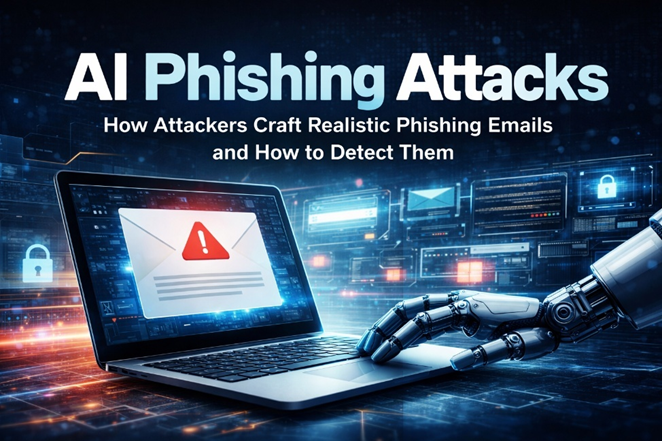
AI phishing attacks are becoming more advanced as attackers use AI generated phishing emails to create highly targeted and context-aware messages. Building on modern threat patterns, AI in phishing detection uses pattern analysis and code-driven techniques to identify subtle indicators early. This article explores real-world examples and practical defenses against evolving AI-driven phishing attacks.
Introduction
An employee receives an email that looks completely routine, such as an internal update or a routine request. The tone is familiar, the wording feels natural, and the timing fits ongoing work.
There are no obvious red flags. This is what makes modern AI phishing attacks different. Instead of poorly written messages, attackers now use AI to generate phishing emails that closely mirror real communication in style, structure, and intent.
How AI Phishing Attacks Are Evolving
AI phishing attacks have shifted from generic spam to highly targeted and realistic messages. Instead of obvious errors, AI generated phishing emails now replicate tone and timing of real communication.
Attackers can create personalized emails at scale. These emails often align with real activities such as account updates or internal requests.
As a result, traditional filters struggle to detect them. This is why AI in phishing detection focuses on analyzing patterns and behavior rather than relying only on static rules.
Real-World Phishing Attack Example
In August 2025, Microsoft detected a phishing campaign where attackers used a compromised business email account to send highly convincing emails designed to steal credentials.
The emails appeared legitimate and were structured to bypass basic detection techniques. Attackers even used tactics like hiding real recipients in BCC fields and disguising malicious content inside seemingly normal files.
Security analysts noted that parts of the attack, including the structure and embedded content, showed characteristics consistent with AI-generated techniques such as overly structured code and realistic business language.
This case highlights how attackers are moving toward AI-assisted techniques to create more realistic and scalable phishing campaigns. Instead of obvious phishing emails, attackers create messages that closely align with internal workflows and messaging patterns.
It also highlights why advanced detection methods are critical, as identifying these attacks requires analyzing patterns, behavior, and subtle anomalies rather than relying only on traditional rules.
How AI Generated Phishing Emails Are Crafted
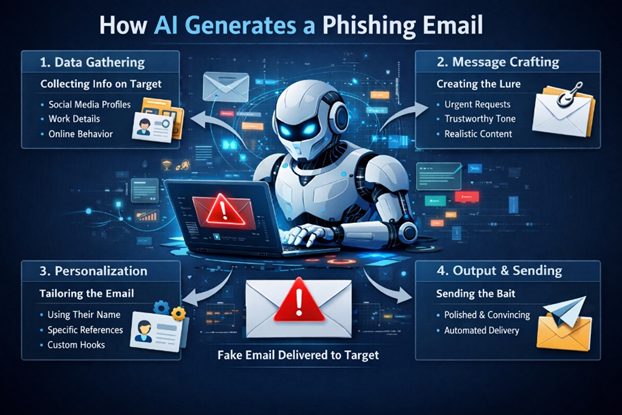
AI generated phishing emails are created by analyzing real communication patterns. Attackers use AI models trained on large datasets to replicate tone, structure, and writing style, including publicly available data and prior communication patterns. This allows attackers to generate emails that align closely with the target’s context and expectations.
Why AI Phishing Attacks Are Hard to Detect
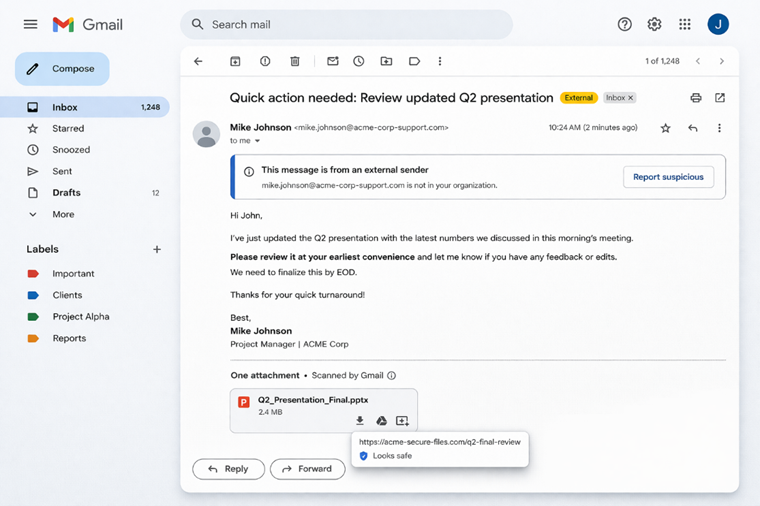
AI phishing attacks are difficult to detect because they remove traditional indicators such as poor grammar, suspicious formatting, or generic messaging.
They are also highly personalized. Messages can reflect specific roles, ongoing tasks, or recent activity, which reduces suspicion and increases engagement.
Another challenge is variation. Attackers can generate multiple versions of the same email, making it harder for traditional filters to identify patterns or block them effectively.
Because of this, rule-based systems often fail. This is where AI in phishing detection becomes important, focusing on patterns, behavior, and subtle inconsistencies rather than just keywords or known signatures.
Detecting Phishing Emails Using Python
Phishing detection can be automated using simple pattern checks. To improve detection, multiple indicators need to be evaluated together rather than relying on a single signal.
Below is a simple example that checks for common phishing indicators such as urgent language, suspicious links, and mismatched domains:
import re

phishing_keywords = ["urgent", "verify your account", "password reset", "immediate action"]

def detect_phishing(email_text):
    score = 0

    # Check for suspicious keywords
    for word in phishing_keywords:
        if word in email_text.lower():
            score += 1

    # Check for URLs
    urls = re.findall(r'https?://\S+', email_text)
    if urls:
        score += len(urls)

    return "Phishing likely" if score > 2 else "Safe"

# Example
email = "Please verify your account immediately at http://fake-login.com"
print(detect_phishing(email))
This basic approach highlights how phishing detection can be automated. However, simple keyword checks are not enough as these messages often avoid obvious triggers.
In practice, AI in phishing detection involves deeper analysis such as:
- Inspecting email headers
- Validating sender domains
- Analyzing link behavior
- Detecting anomalies in writing patterns
These techniques help move beyond static rules and improve detection of more advanced AI phishing attacks.
Email Analysis Techniques for Phishing Detection
- Header analysis: Check sender domains, reply-to addresses, and inconsistencies in email routing.
- URL inspection: Identify mismatched or shortened links that may redirect to malicious sites.
- Domain verification: Compare sender domains with trusted sources to detect spoofing attempts.
- Content pattern analysis: Look for subtle anomalies in tone, structure, or intent, especially in such emails.
- Behavioral signals: Analyze how and when emails are sent, including unusual timing or targeting patterns.
These methods form the foundation of AI in phishing detection, where multiple signals are evaluated together to identify threats that appear legitimate in isolation.
How AI in Phishing Detection Improves Security
AI in phishing detection enhances security. Instead of relying on isolated rules, it identifies patterns and anomalies that indicate potential threats.
This allows security systems to detect AI phishing attacks earlier and reduce false positives, improving overall response efficiency.
Practical Code Defenses Against AI Phishing Attacks
To strengthen detection, multiple signals can be combined instead of relying on a single rule. This improves detection accuracy.
Here is a simple example that checks keywords, URLs, and domain mismatches together:
import re
from urllib.parse import urlparse

trusted_domains = ["company.com"]

phishing_keywords = ["urgent", "verify", "reset", "immediate"]

def extract_domain(url):
    return urlparse(url).netloc

def detect_phishing(email_text, sender_email):
    score = 0

    # Keyword check
    for word in phishing_keywords:
        if word in email_text.lower():
            score += 1

    # URL check
    urls = re.findall(r'https?://\S+', email_text)
    for url in urls:
        domain = extract_domain(url)
        if domain not in trusted_domains:
            score += 2

    # Sender domain check
    sender_domain = sender_email.split("@")[-1]
    if sender_domain not in trusted_domains:
        score += 2

    return "Phishing likely" if score > 3 else "Safe"

# Example
email = "Reset your password now: http://secure-login-alert.com"
sender = "support@fake-company.com"
print(detect_phishing(email, sender))
This approach combines multiple indicators to improve detection accuracy. While still simple, it reflects how AI in phishing detection moves beyond isolated checks.
In real-world scenarios, systems expand this further by analyzing behavior, historical patterns, and communication context to detect AI generated phishing emails more effectively.
Key Takeaways
- These attacks often bypass rule-based filters due to their variation and personalization.
- Detecting them requires analyzing multiple signals such as content, links, domains, and behavior.
- AI in phishing detection improves accuracy by identifying patterns instead of relying only on static rules.
- Programmatic approaches using Python provide a practical way to detect suspicious email activity.
- Building layered, code-driven defenses is essential to counter evolving AI-driven phishing threats.
What’s Next: AI Malware Evolution
AI phishing attacks are only one part of a larger shift in cyber threats. As attackers continue to adopt AI, the focus is expanding beyond emails to more advanced forms of malware that can adapt, evade detection, and operate with minimal human input.
AI-driven malware can modify its behavior based on the environment, making it harder to identify using traditional security methods. Just as AI generated phishing emails improved deception, AI-powered malware is enhancing persistence and evasion.
Understanding this progression is critical. The same principles used in AI in phishing detection such as pattern analysis and contextual signals will play a key role in identifying these next-generation threats.
In the next article, we explore how AI malware is evolving and what it means for modern cybersecurity defenses